






League of Legends Control: how to properly get rid of your account
This guide details how to deactivate your Riot Games account, effective as of 2025. Remember, this action permanently impacts all Riot Games titles.
Table of Contents
- Instructions
- What Happens After You Delete Your Account?
- Can You Restore Your Account After Deletion?
- Why Do People Delete Their Accounts?
Instructions
Step 1: Log in to your account on the official Riot Games website. Locate the "My account" button (usually on the left sidebar). A menu will appear; select "Settings."

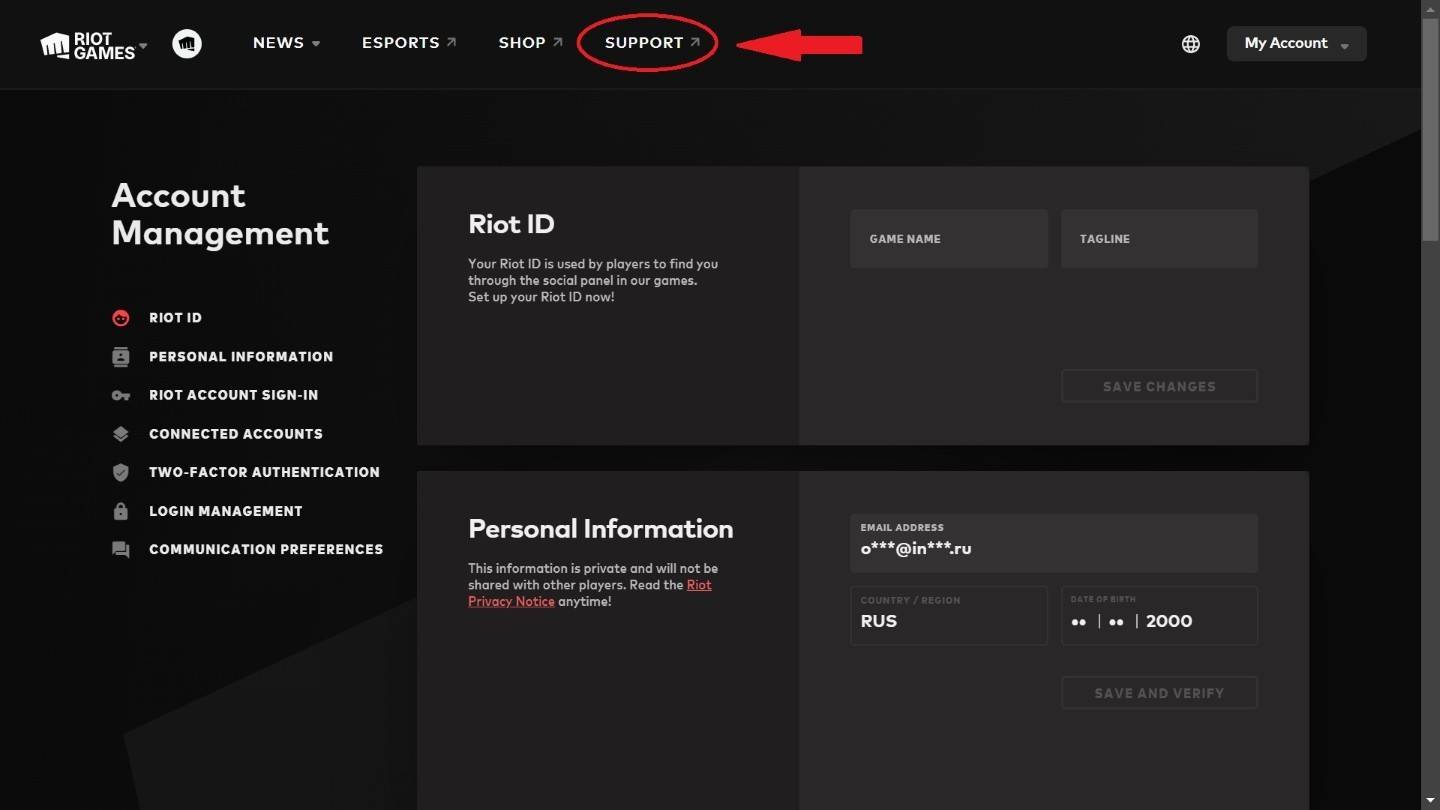
Step 2: In your account settings, find the "Support" button (typically at the top). Click it to proceed.
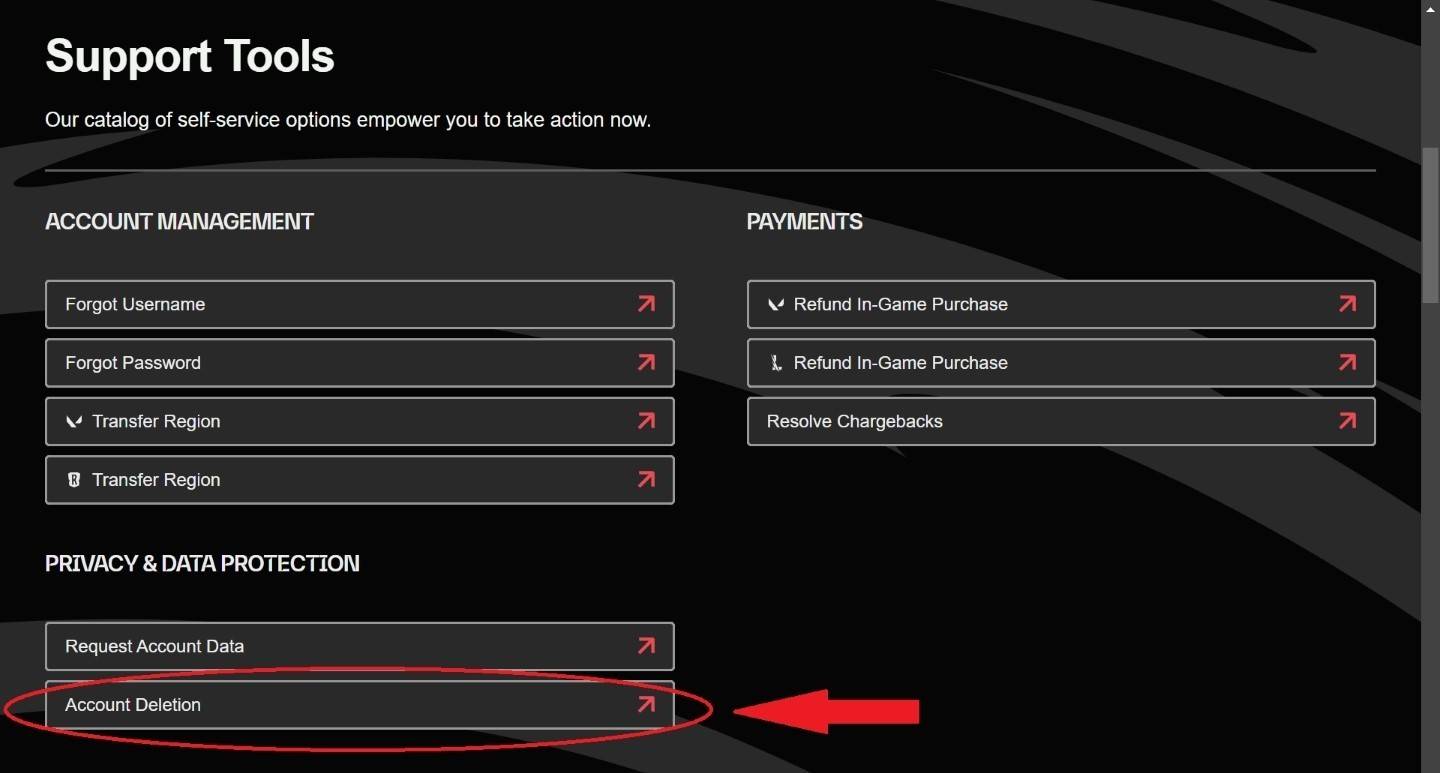
Step 3: On the support page, scroll down to the "Support Tools" section. Locate and click the "Account Deletion" button.
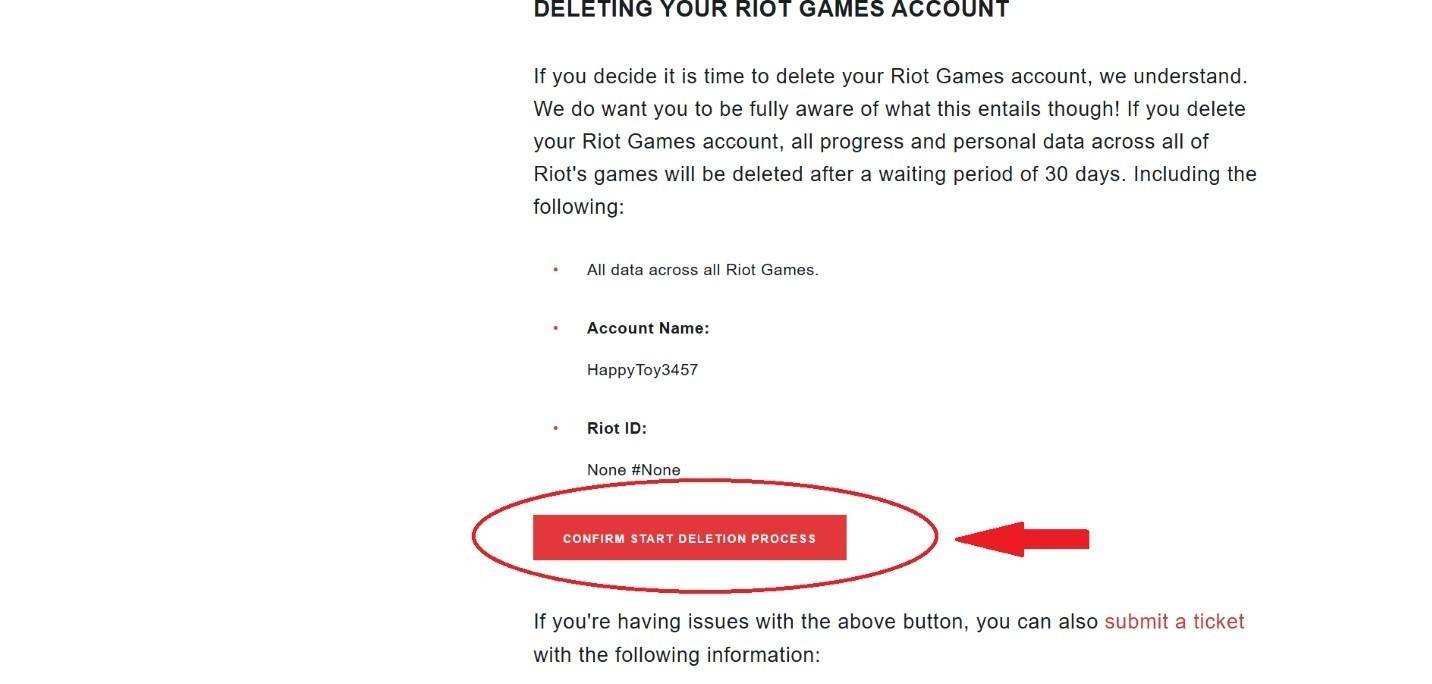
Step 4: You'll be redirected to a confirmation page. Click "Confirm start deletion progress" to initiate the 30-day deactivation period. You can cancel this process anytime within those 30 days.
Deleting your account takes four simple steps. Remember, this affects all Riot Games games. Your account will be deactivated for 30 days. Before proceeding, remove any linked payment information.
What Happens After You Delete Your Account?
Riot Games requires 30 days to permanently delete your account. During this period, your account is inactive. After 30 days, the account, username, in-game items, and personal data are permanently deleted. Your username becomes available for other players. You have until day 25 to contact support and cancel the deletion.
Can You Restore Your Account After Deletion?
No. Account restoration is impossible after the 30-day period. If your account was compromised and deleted by hackers, contact Riot Games support; however, recovery isn't guaranteed, especially after complete deletion.
Why Do People Delete Their Accounts?
Reasons for account deletion vary widely. Loss of interest, or addressing gaming addiction are common causes. While deleting the account might seem like a solution, the desire to return may resurface later.
For those struggling with gaming addiction (excessive spending, neglecting responsibilities, social isolation), deleting the account can be a crucial step towards regaining control. This can help players focus on their studies or work without distractions. However, it's important to note that this may only be a temporary solution, and professional help might be necessary for overcoming gaming addiction.
-
 Jan 11,25Teamfight Tactics drops patch notes for final update of Inkborn Fables in version 14.14 Teamfight Tactics Patch 14.14: Final Inkborn Fables Update Details Unveiled! Get ready for the final chapter of Inkborn Fables in Teamfight Tactics with patch 14.14! Riot Games has revealed exciting changes, including a significant increase in encounter frequency and adjusted encounter rates. Prepa
 -
 Feb 11,25Pokémon Go Celebrates New Year's 2025 Pokémon Go Rings in 2025 with a Festive New Year's Event and More! As 2024 concludes, Niantic is celebrating the arrival of 2025 in Pokémon Go with a special New Year's event. This precedes the Fidough Fetch event and the highly anticipated Sprigatito Community Day. Kicking off the new year is the
 -
 Jun 14,25Pokémon Launches Real Pokédex Encyclopedia Crafted by Ecologists and Behaviorists Get ready, Pokémon fans—The Pokémon Company is stepping into the world of science with a brand-new official encyclopedia written by expert animal ecologists and behaviorists. Discover what Pokécology has in store for trainers and researchers alike.Pokécology: An Official Encyclopedia For Pokémon Beh
 -
 May 05,25Pokémon Go Tour: Unova Reveals Exciting New Details Get ready for an exciting journey as the Pokémon Go Tour: Unova approaches, bringing a host of new features and updates to the game. Whether you're a fan of new music, exclusive avatar items, or thrilling Special Research, there's something for everyone as you dive into the world of Unova and its Po