






Modern Game Mechanics: A Beginner's Guide to Expert Management
Modern Community is an immersive puzzle-strategy game where you design, expand, and manage a prosperous futuristic town. As the newly appointed community manager of the struggling Golden Heights society, your mission is to strengthen its economy, infrastructure, and social harmony while working with other players to build a unified, interconnected world. This beginner’s guide explores the core gameplay mechanics of Modern Community to help you get started. Read on for a full walkthrough below!
Master the Core Match-3 Mechanics in Modern Community
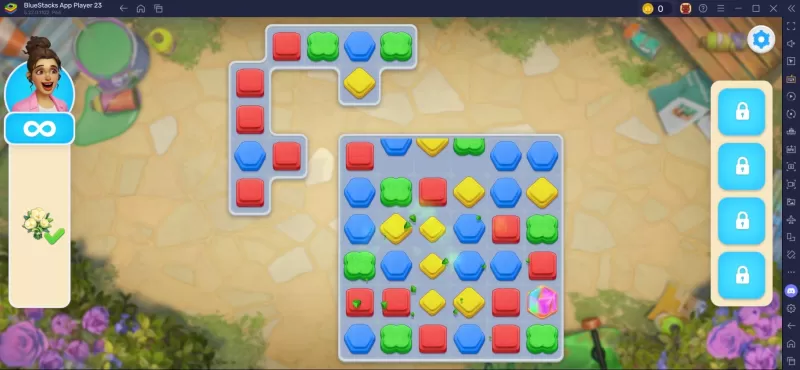
Match-3 gameplay is central to completing tasks for residents in Modern Community. This section breaks down how the system works. The main play area appears in the center of the screen, with your avatar and power-ups positioned on the left and right sides. In the middle, you’ll see a grid of match-3 tiles in colors such as green, blue, red, and yellow. Aligning three or more tiles of the same color clears them and any tiles directly beneath. You can only match tiles by swapping them horizontally or vertically with adjacent matching colors.
Understanding the Community Pass
The Community Pass in Modern Community works much like battle passes or seasonal tiers in other mobile games. If you're new to the concept, the pass is a rotating list of daily and seasonal quests. Completing these quests earns you pass experience, helping you level up the Community Pass. It comes in two tiers: Free and Paid. Each offers different rewards, with the paid version naturally providing more exclusive items. Even with the free pass, you can collect plenty of coins, boosters, extra moves, and other useful resources.
Players can also enjoy Modern Community on a larger screen using BlueStacks on their PC or laptop, with full keyboard and mouse support.
-
 Jan 11,25Teamfight Tactics drops patch notes for final update of Inkborn Fables in version 14.14 Teamfight Tactics Patch 14.14: Final Inkborn Fables Update Details Unveiled! Get ready for the final chapter of Inkborn Fables in Teamfight Tactics with patch 14.14! Riot Games has revealed exciting changes, including a significant increase in encounter frequency and adjusted encounter rates. Prepa
 -
 Feb 11,25Pokémon Go Celebrates New Year's 2025 Pokémon Go Rings in 2025 with a Festive New Year's Event and More! As 2024 concludes, Niantic is celebrating the arrival of 2025 in Pokémon Go with a special New Year's event. This precedes the Fidough Fetch event and the highly anticipated Sprigatito Community Day. Kicking off the new year is the
 -
 Jun 14,25Pokémon Launches Real Pokédex Encyclopedia Crafted by Ecologists and Behaviorists Get ready, Pokémon fans—The Pokémon Company is stepping into the world of science with a brand-new official encyclopedia written by expert animal ecologists and behaviorists. Discover what Pokécology has in store for trainers and researchers alike.Pokécology: An Official Encyclopedia For Pokémon Beh
 -
 May 05,25Pokémon Go Tour: Unova Reveals Exciting New Details Get ready for an exciting journey as the Pokémon Go Tour: Unova approaches, bringing a host of new features and updates to the game. Whether you're a fan of new music, exclusive avatar items, or thrilling Special Research, there's something for everyone as you dive into the world of Unova and its Po