






MU Immortal Leveling Guide: Fast Progression Tips
MU Immortal is a mobile MMORPG that revitalizes the legendary MU Online universe with contemporary graphics, engaging combat, and a deeply immersive world. It masterfully combines thrilling action with extensive character development, enabling players to enhance their equipment, wings, companions, and abilities to forge a truly distinct hero. Given this, advancing your character's level is a fundamental step toward gaining power. This guide offers tailored advice to accelerate your leveling progress. Explore the strategies outlined below.
Focus on Main Story Quests
Main story quests are core missions available to every player, irrespective of their current level or chosen class. These objectives appear on the left side of your screen, highlighted in gold. Quests are categorized into two types: Main Quests (gold) and Side Quests (blue). While both contribute to your advancement, the main questline delivers substantially greater experience points and rewards. Completing it is also crucial for unlocking previously inaccessible game features and modes.
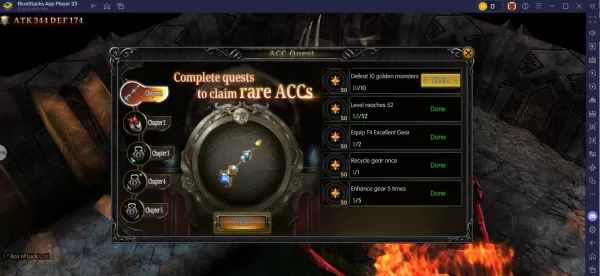
A good strategy is to monitor your character's level against enemy difficulty. For instance, upon reaching Level 50, you should efficiently farm monsters between Levels 40 and 50 for optimal experience yields. Continuously repeat this cycle, targeting higher-level foes as your own power grows and you surpass previous challenges.
Venture into Dungeons for Experience and Loot
Dungeons are a premier method for gaining levels in MU Immortal. The dungeon system becomes accessible at level 30. Once unlocked, you can enter them directly via the map for instant teleportation. To fully conquer a dungeon, you must clear all enemies within. Overcoming these challenges grants not only rare and valuable items but also massive amounts of experience, making dungeons an essential component of your progression path.
For an enhanced experience, you can play MU Immortal on your PC or laptop using BlueStacks, enjoying the game on a larger screen with the precision of a keyboard and mouse.
-
 Jan 11,25Teamfight Tactics drops patch notes for final update of Inkborn Fables in version 14.14 Teamfight Tactics Patch 14.14: Final Inkborn Fables Update Details Unveiled! Get ready for the final chapter of Inkborn Fables in Teamfight Tactics with patch 14.14! Riot Games has revealed exciting changes, including a significant increase in encounter frequency and adjusted encounter rates. Prepa
 -
 Feb 11,25Pokémon Go Celebrates New Year's 2025 Pokémon Go Rings in 2025 with a Festive New Year's Event and More! As 2024 concludes, Niantic is celebrating the arrival of 2025 in Pokémon Go with a special New Year's event. This precedes the Fidough Fetch event and the highly anticipated Sprigatito Community Day. Kicking off the new year is the
 -
 Jun 14,25Pokémon Launches Real Pokédex Encyclopedia Crafted by Ecologists and Behaviorists Get ready, Pokémon fans—The Pokémon Company is stepping into the world of science with a brand-new official encyclopedia written by expert animal ecologists and behaviorists. Discover what Pokécology has in store for trainers and researchers alike.Pokécology: An Official Encyclopedia For Pokémon Beh
 -
 May 05,25Pokémon Go Tour: Unova Reveals Exciting New Details Get ready for an exciting journey as the Pokémon Go Tour: Unova approaches, bringing a host of new features and updates to the game. Whether you're a fan of new music, exclusive avatar items, or thrilling Special Research, there's something for everyone as you dive into the world of Unova and its Po