






How to Change Day Length in Fields of Mistria
The major v0.13.0 update for *Fields of Mistria* introduces a game-changer: adjustable daytime speed! This highly requested feature lets you pack more into each in-game day. Need help mastering this time-bending trick? This guide shows you how to change day length.
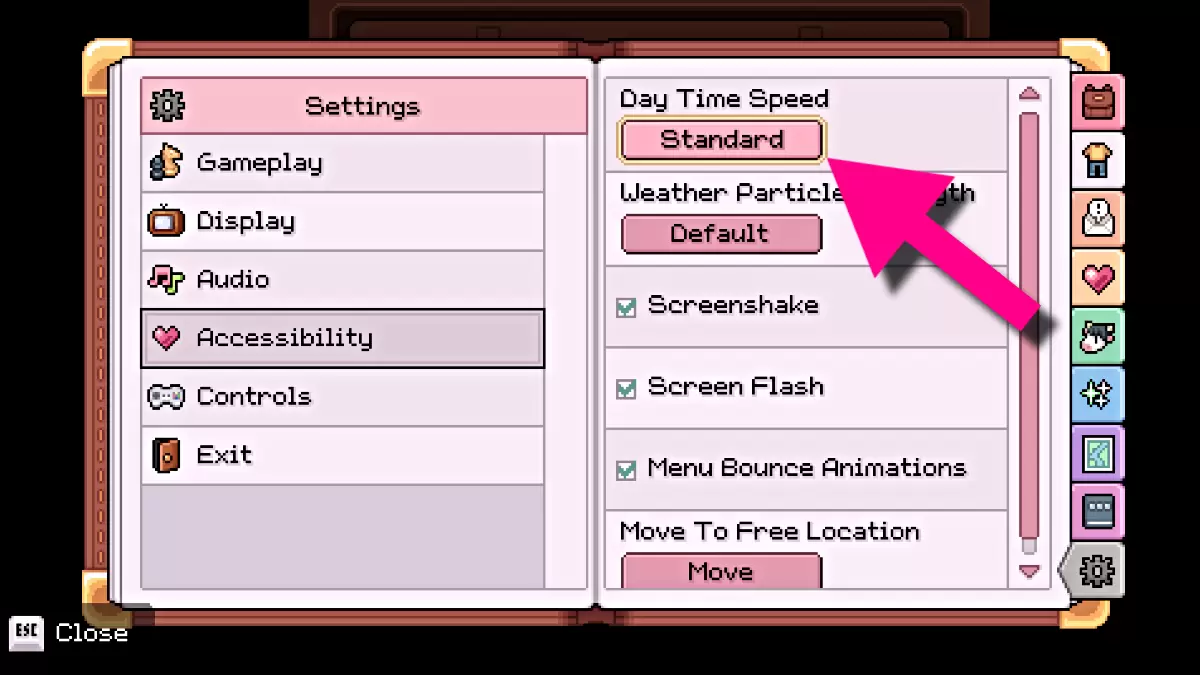
Thanks to the March 10th v0.13.0 update, you can now control the length of your in-game days. This feature is accessible to all players, regardless of progress.
First, load your save from the Main Menu. Once on your farm, open the Pause Menu and click the **Settings tab** (cog wheel icon) at the bottom. Select **‘Accessibility’** from the left-hand menu. At the top, you'll find the **‘Day Time Speed’** option, initially set to ‘Standard.’
Selecting this option will warn you that altering daytime length might affect NPC schedules, optimized for the ‘Standard’ setting. If you're okay with that, adjust the meter to **‘Longer’** or **‘Longest’**. ‘Longer’ significantly increases daytime, while ‘Longest’ provides even more time—generally the preferred choice.
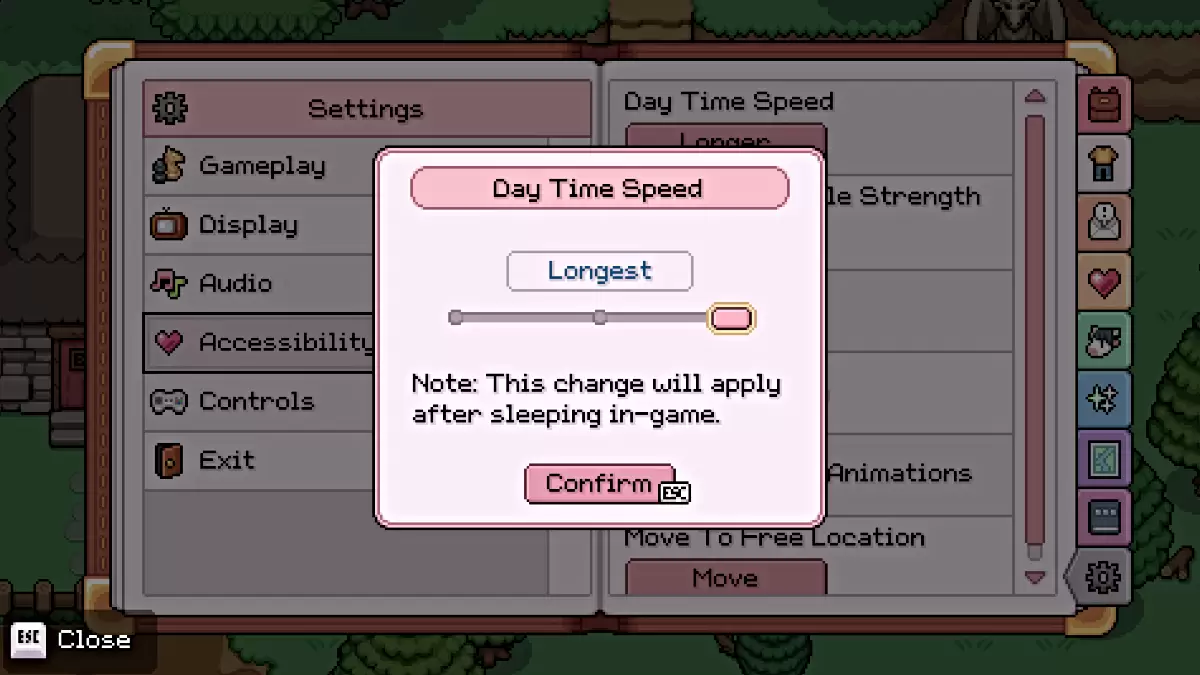
To activate the change, simply **sleep in your bed** until the day transitions. The new daytime duration will then be in effect. Repeat the process to switch between settings.
In cozy farming sims like *Fields of Mistria* (and *Stardew Valley*), time management is crucial. Normally, each day offers a limited window to complete tasks. Scheduling is essential, and lengthy activities like mining often consume a whole day. The Teleportation Chalice helps, but this new update offers an even better solution.
That's how to adjust day length in *Fields of Mistria*! Check out our other guides, including how to make money quickly.
-
 Jan 11,25Teamfight Tactics drops patch notes for final update of Inkborn Fables in version 14.14 Teamfight Tactics Patch 14.14: Final Inkborn Fables Update Details Unveiled! Get ready for the final chapter of Inkborn Fables in Teamfight Tactics with patch 14.14! Riot Games has revealed exciting changes, including a significant increase in encounter frequency and adjusted encounter rates. Prepa
 -
 Feb 11,25Pokémon Go Celebrates New Year's 2025 Pokémon Go Rings in 2025 with a Festive New Year's Event and More! As 2024 concludes, Niantic is celebrating the arrival of 2025 in Pokémon Go with a special New Year's event. This precedes the Fidough Fetch event and the highly anticipated Sprigatito Community Day. Kicking off the new year is the
 -
 Jun 14,25Pokémon Launches Real Pokédex Encyclopedia Crafted by Ecologists and Behaviorists Get ready, Pokémon fans—The Pokémon Company is stepping into the world of science with a brand-new official encyclopedia written by expert animal ecologists and behaviorists. Discover what Pokécology has in store for trainers and researchers alike.Pokécology: An Official Encyclopedia For Pokémon Beh
 -
 May 05,25Pokémon Go Tour: Unova Reveals Exciting New Details Get ready for an exciting journey as the Pokémon Go Tour: Unova approaches, bringing a host of new features and updates to the game. Whether you're a fan of new music, exclusive avatar items, or thrilling Special Research, there's something for everyone as you dive into the world of Unova and its Po