






Best Graphics Settings in Monster Hunter Wilds
*Monster Hunter Wilds* is a visually stunning game, but achieving the best performance while maintaining high-quality visuals can be a challenge. Here are the best graphics settings to optimize your experience in *Monster Hunter Wilds*.
Monster Hunter Wilds System Requirements
If you're aiming for higher resolutions or max settings, you'll need a high-end GPU with more VRAM and a powerful CPU. Check out where you can order *Monster Hunter Wilds* for your desired platform.
| Minimum Requirements | Recommended Requirements |
| OS: Windows 10 or newer CPU: Intel Core i5-10600 / AMD Ryzen 5 3600 Memory: 16GB RAM GPU: NVIDIA GTX 1660 Super / AMD Radeon RX 5600 XT (6GB VRAM) DirectX: Version 12 Storage: 140GB SSD required Performance Expectation: 30 FPS @ 1080p (upscaled from 720p) | OS: Windows 10 or newer CPU: Intel Core i5-11600K / AMD Ryzen 5 3600X Memory: 16GB RAM GPU: NVIDIA RTX 2070 Super / AMD RX 6700XT (8-12GB VRAM) DirectX: Version 12 Storage: 140GB SSD required Performance Expectation: 60 FPS @ 1080p (Frame Generation enabled) |
Monster Hunter Wilds Best Graphics Settings
Whether you have a high-end RTX 4090 or a budget RX 5700XT build, optimizing the graphics settings in *Monster Hunter Wilds* is crucial. You can achieve significant performance gains without sacrificing much visual quality. In modern games, the difference between Ultra and High settings is often minimal visually, but the performance impact can be substantial.
Display Settings
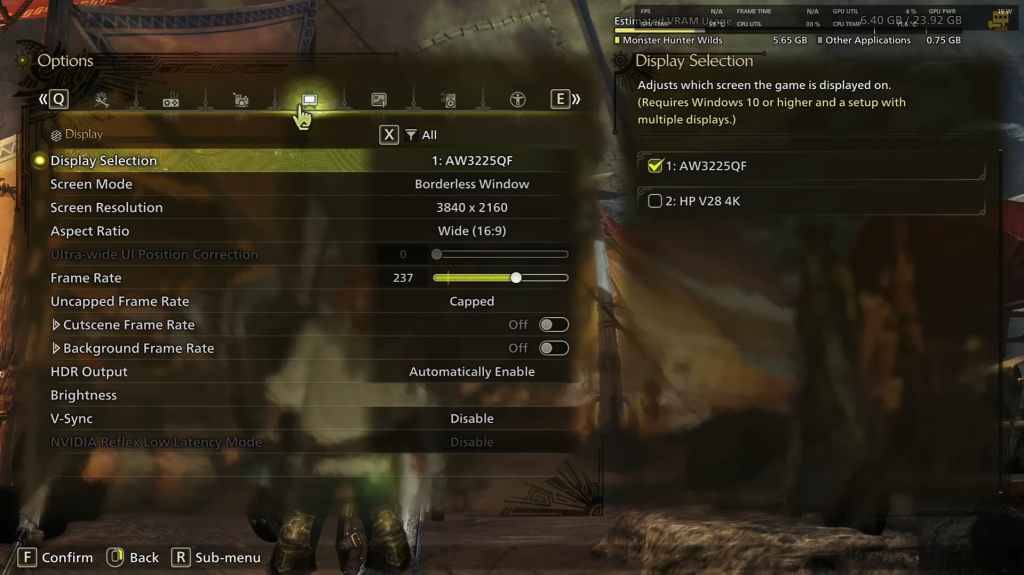
- Screen Mode: Personal Preference, Bordered Fullscreen works better if you tab out frequently.
- Resolution: Monitor's Native Resolution
- Frame Rate: Match your Monitor's Refresh Rate (e.g., 144, 240, etc.)
- V-Sync: Off for lower input lag.
Graphics Settings
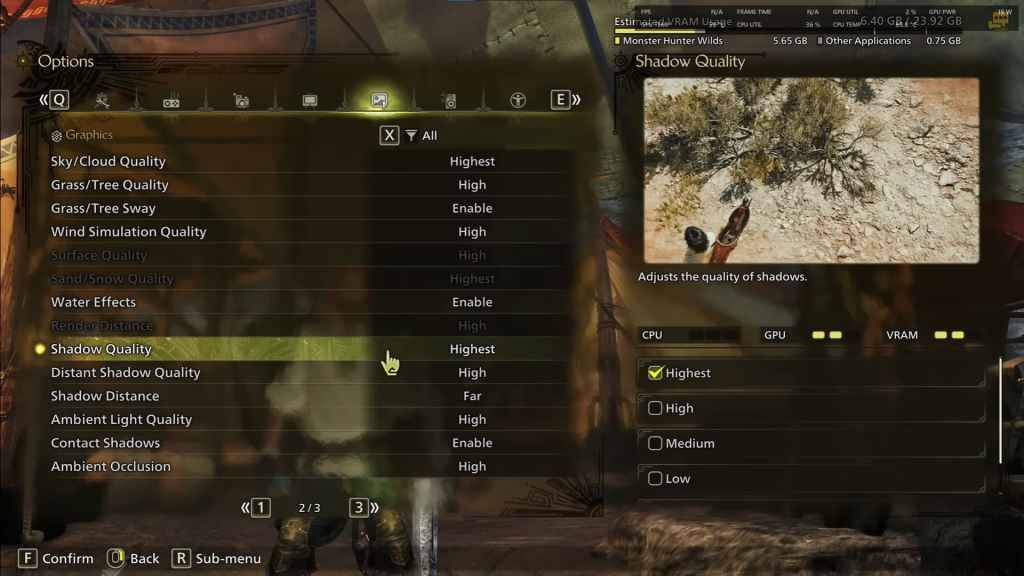
| Setting | Recommended | Description |
| Sky/Cloud Quality | Highest | Enhances atmospheric detail |
| Grass/Tree Quality | High | Affects vegetation detail |
| Grass/Tree Sway | Enabled | Adds realism but has a minor performance impact |
| Wind Simulation Quality | High | Improves environmental effects |
| Surface Quality | High | Details on the ground and objects |
| Sand/Snow Quality | Highest | For detailed terrain textures |
| Water Effects | Enabled | Adds reflections and realism |
| Render Distance | High | Determines how far objects are rendered |
| Shadow Quality | Highest | Improves lighting but is demanding |
| Distant Shadow Quality | High | Enhances shadow detail at a distance |
| Shadow Distance | Far | Controls how far shadows extend |
| Ambient Light Quality | High | Enhances shadow detail at a distance |
| Contact Shadows | Enabled | Enhances small object shadowing |
| Ambient Occlusion | High | Improves depth in shadows |
These settings prioritize visual fidelity over raw FPS, as *Monster Hunter Wilds* is not a competitive game. However, every PC build is different, so feel free to tweak these settings if you're still experiencing low frame rates.
The first adjustments you can make are to turn down Shadows and Ambient Occlusion, as they are the most resource-intensive. Additionally, reducing distant shadows and shadow distance can significantly boost FPS. You can also lower Water Effects and Sand/Snow Quality to reduce VRAM usage.
Best Settings for Different Builds
Not everyone has a high-end build capable of running games at 4K. Here are the best settings tailored to different tiers of PC builds:
Note: Settings not mentioned below should be left at their default values.
Mid-Range Build (GTX 1660 Super / RX 5600 XT)
- Resolution: 1080p
- Upscaling: AMD FSR 3.1 Balanced
- Frame Gen: Off
- Textures: Low
- Render Distance: Medium
- Shadow Quality: Medium
- Distant Shadow Quality: Low
- Grass/Tree Quality: Medium
- Wind Simulation: Low
- Ambient Occlusion: Medium
- Motion Blur: Off
- V-Sync: Off
- Expected Performance: ~40-50 FPS at 1080p
Recommended Build (RTX 2070 Super / RX 6700XT)
- Resolution: 1080p
- Upscaling: FSR 3.1 Balanced
- Frame Gen: Enabled
- Textures: Medium
- Render Distance: Medium
- Shadow Quality: High
- Distant Shadow Quality: Low
- Grass/Tree Quality: High
- Wind Simulation: High
- Ambient Occlusion: Medium
- Motion Blur: Off
- V-Sync: Off
- Expected Performance: ~60 FPS at 1080p
High-End Build (RTX 4080 / RX 7900 XTX)
- Resolution: 4K
- Upscaling: DLSS 3.7 Performance (NVIDIA) / FSR 3.1 (AMD)
- Frame Gen: Enabled
- Textures: High
- Render Distance: Highest
- Shadow Quality: High
- Distant Shadow Quality: High
- Grass/Tree Quality: High
- Wind Simulation: High
- Ambient Occlusion: High
- Motion Blur: Off
- V-Sync: Off
- Expected Performance: ~90-120 FPS at 4K (upscaled)
*Monster Hunter Wilds* offers numerous graphical options, but not all impact gameplay equally. If you're struggling with performance, reducing shadows, ambient occlusion, and render distance can help. Budget users should utilize FSR 3 upscaling to boost FPS, while high-end builds can handle 4K settings with frame generation.
For the best balance, use a mix of medium to high settings, enable upscaling, and adjust shadows and distance settings based on your hardware.
And those are the best graphics settings for *Monster Hunter Wilds*.
*Monster Hunter Wilds is available now on PlayStation, Xbox, and PC.*
-
 Jan 11,25Teamfight Tactics drops patch notes for final update of Inkborn Fables in version 14.14 Teamfight Tactics Patch 14.14: Final Inkborn Fables Update Details Unveiled! Get ready for the final chapter of Inkborn Fables in Teamfight Tactics with patch 14.14! Riot Games has revealed exciting changes, including a significant increase in encounter frequency and adjusted encounter rates. Prepa
 -
 Feb 11,25Pokémon Go Celebrates New Year's 2025 Pokémon Go Rings in 2025 with a Festive New Year's Event and More! As 2024 concludes, Niantic is celebrating the arrival of 2025 in Pokémon Go with a special New Year's event. This precedes the Fidough Fetch event and the highly anticipated Sprigatito Community Day. Kicking off the new year is the
 -
 Jun 14,25Pokémon Launches Real Pokédex Encyclopedia Crafted by Ecologists and Behaviorists Get ready, Pokémon fans—The Pokémon Company is stepping into the world of science with a brand-new official encyclopedia written by expert animal ecologists and behaviorists. Discover what Pokécology has in store for trainers and researchers alike.Pokécology: An Official Encyclopedia For Pokémon Beh
 -
 May 05,25Pokémon Go Tour: Unova Reveals Exciting New Details Get ready for an exciting journey as the Pokémon Go Tour: Unova approaches, bringing a host of new features and updates to the game. Whether you're a fan of new music, exclusive avatar items, or thrilling Special Research, there's something for everyone as you dive into the world of Unova and its Po